


The best gaming mouse provides you with the most satisfying sweeps, clicks, and hand feel possible. Whether it's lining up a perfect headshot in Counter-Strike 2 or allowing for pixel-perfect unit placement in League of Legends, the last thing you need is an unreliable rodent costing you the game. And if you're looking into a wireless gaming mouse, it should have all that and a long battery life, too.
The best wireless gaming mouse is the Razer Viper V4 Pro, although you will pay a pretty penny for the privilege. The best wired gaming mouse is the Glorious Model O Eternal, as it packs in some great specs and has a great shape for a very cheap price.
You don't need to spend a fortune to get a wireless gaming mouse, either. The best budget wireless mouse is the Mchose G3 V2 Pro. And if you want something on the bleeding edge of competitive tech for tactical shooters, the Logitech G Pro X3 Superstrike offers very speedy clicks thanks to its analogue switches.

Jacob is PC Gamer's resident mouse guru, having what some might call an unhealthy obsession with the little rodents. In addition to spending far too many hours in Counter-Strike, he's also spent plenty of time in other games, so he knows just how different kinds of mice can benefit different kinds of gamers. It helps that he's got stacks of mice to hand every day for comparison, too.
October 29, 2026: I've got rid of a couple of choices that are no longer relevant or well-priced, and added in the X3 Superstrike to replace the X2 as the best competitive, added the Rival Pro thanks to its hot swappable batteries, and swapped the G Pro out for the G Pro 2 Lightspeed Wireless.
May 14, 2026: I've updated the list to include approximate pricing for each of our best gaming mouse picks.
April 9, 2026: Swapped out a few picks for some newer, better ones. Most noteworthy is that the Razer Viper V4 Pro now takes the top spot ahead of the DeathAdder V4 Pro, as it beats it on the spec front, is lighter, and has practically perfect build quality.
The best overall


✅ You want leading performance: This mouse has an absolute top-of-the-line sensor, and it's packaged inside a top-quality, lightweight chassis.
❌ You want RGB or other features: As luxurious as the base experience is with this mouse, it does lack some nice-to-haves such as RGB lighting and extra buttons.
The Razer Viper V4 Pro is undoubtedly the best gaming mouse on the market right now. Previously, it was the DeathAdder V4 Pro, but the new Viper has taken many of those DeathAdder specs and dialed things up even further.
It's lighter, has a faster sensor, more battery life, and has pretty much flawless build quality, making it feel incredibly premium to hold and use. Other than RGB and a plethora of buttons, it has everything you should want out of a gaming mouse, whether that's for casual or competitive play.
The clicks have no pre-travel and are gloriously tactile, the coating feels good under-hand, the side buttons feel fantastic, the scroll wheel is phenomenal, and the light weight and smooth skates keep it gliding across the top of any mouse pad with ease.
There's only one potential downside, and that's the sound made by those optical switches under the left and right mouse buttons. As with other optical switches we've tried, they are very loud, clicky, and a little hollow-sounding. It's something you get used to, and if you have headphones on you won't notice it, but it won't be for everyone (perhaps not for your family or housemates). They feel great, though.
The battery life on the Viper V4 Pro is also worth a mention, as 180 hours at 1,000 Hz for top-tier sensor performance in a lightweight mouse is no joke. This has been achieved thanks to Razer's new FrameSync tech, which can be thought of as akin to a monitor's variable refresh rate (VRR) but for your mouse's sensor. In the end, though, fancy new technologies aren't what make the Viper V4 Pro such a great overall mouse. What makes it the best is that it shows what flawless design and build quality can do when applied to every area of a mouse. Using it is a delight, and there's no higher praise than that for a gaming mouse.

Read our full Razer Viper V4 Pro review.
The best wired gaming mouse


✅ You want a brilliant, affordable gaming mouse: For most folks, the Model O Eternal is the ideal gaming mouse, with a great blend of comfort and power for its modest asking price.
❌ You want more advanced features: You don't get more advanced features such as higher polling rates or wireless connectivity with the Model O Eternal, although rivals with it will cost you a lot more.
There are cheaper gaming mice and there are way more expensive gaming mice, but assuming you're looking for something cheap when it comes to the best wired gaming mouse, the Glorious Model O Eternal is gonna be your best bet.
Packing a super-accurate PixArt 3311 optical sensor, the Model O Eternal will have no trouble keeping up with any gamer's frantic mouse movement. Sure, the maximum DPI of 12,000 is considerably lower than the best gaming mouse on the market, but it's more than enough for most users, and it's way better than what you normally get in a $40 wired mouse.
The cheese-grater styled shell helps to shave the weight down to a mere 55 grams (1.9 ounces), making it a joy to use over long gaming sessions. If you don't like the fancy RGB lighting, it's easy to turn it all off via the Glorious Core application, where you can also configure the functions of each mouse button. And speaking of clickers, each button and the middle wheel are of excellent quality, albeit somewhat on the loud side.
Only one thing gives away the Model O Eternal's price tag, and it's the very cheap-feeling cable. But how often do you go around touching a mouse's cable to be that concerned about it? When you're getting such a great mouse for so little money, it's not hard to see why we rate the Glorious Model O Eternal so highly.

Read our full Glorious Model O Eternal review.
The best budget wireless gaming mouse


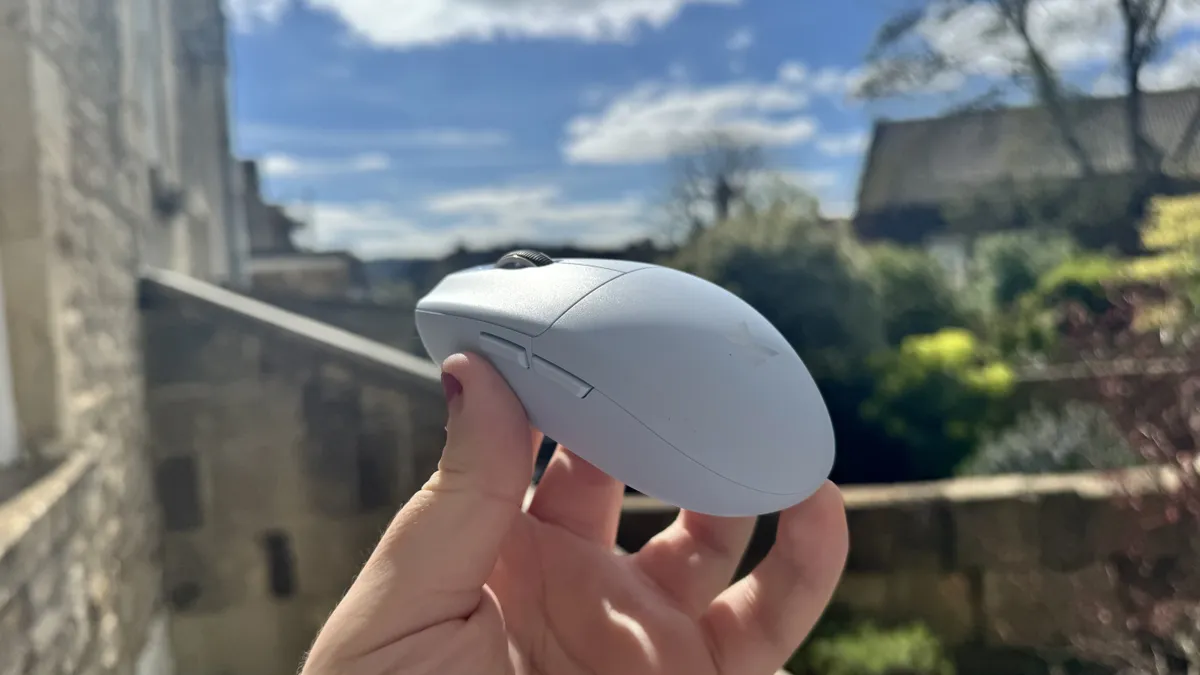


✅ You want solid minimalism: There's not much extra or flashy to this mouse, but if you want good performance that's comfy to use, for a low price tag, it's great.
❌ You have bigger hands: Unless you use a fingertip or aggressive claw grip, you might struggle to keep all your fingers firmly planted on this mouse if you have big hands.
Well well well, if it isn't the return of the egg. Our previous pick for the best budget gaming mouse was the egg-shaped Logitech G305 Lightspeed, and now it's been replaced by a veritable clone, the Mchose G3 V2 Pro. There's no keeping the eggs from this spot.
It's not just because of its wonderfully eggy shape that the G3 V2 Pro is the best budget gaming mouse, though. It's because it's so incredibly cheap for what you're getting, which is a very solid mouse overall. Don't worry if you've not heard of Mchose before, either. It's a brand that, amongst other things, makes some great and usually cheaper alternatives to popular mouse shapes from more mainstream brands. The components are quality, even if they don't have a proprietary name to them.
Take the PAW3395 sensor in the Pro version, for instance. That's a quality sensor that's used in a bunch of great mice and is on the level with proprietary ones such as the Razer Focus X 26K. Apart from the sensor, you're getting a sturdy mouse with some nice and tactile clicks (thanks to those Omron mechanical switches), great battery life, and connectivity over 2.4 GHz wireless, Bluetooth, or wired with a USB-C cable. It weighs just 59 g, too, which isn't as light as some ultralights these days but is reasonably light even for competitive gaming.
If you want to save a few extra dollars, you can instead opt for the non-Pro version of this mouse, which is the same except it has a lower-specced PAW3311 sensor. With that one you're getting a maximum of just 12,000 DPI, but that should still be enough for most gamers. The rest of the mouse is the same minimalist, lightweight, eggy goodness. Overall, though, it's just a very versatile and solid all-round mouse for a very appealing price tag. Well worth considering if you're on a budget.

Read our full Mchose G3 V2 review.
The best competitive gaming mouse


✅ You want a competitive edge: There's no denying the improvement to click latency here. If you want that slight extra edge to help nail those headshots a little quicker than your opponents, the Superstrike should help.
❌ You want the lightest mouse: Logitech has chosen to compete on click latency rather than weight reduction, here, and if you want to go as light as possible, something like the Corsair Sabre V2 Pro below will be a better bet.
The Logitech G Pro X3 Superstrike's predecessor launched only a few months prior to it, but the X3 version smooths out some of the first version's wrinkles. With those wrinkles thoroughly smoothed, the X3 Superstrike takes the spot as the best competitive gaming mouse.
That's thanks to its haptic-inductive trigger system (HITS), ie, its analog clicks. This allows for fully adjustable actuation and rapid trigger, just like Hall effect keyboards can do. This lets you click incredibly fast, with little latency between deciding to press the mouse button to shoot and having your gun fire in-game. It won't help you aim or notice enemies quicker, but it should shave some milliseconds off your reaction time, and every little can help in a competitive shooter.
One of the tricks Logitech is pulling out of its sleeve here is combining the inductive analogue system with haptic feedback, so when the click registers at your chosen actuation point, haptic feedback makes the button vibrate. They must have an actual sorcerer over at Logitech HQ, because somehow the company has managed to make that vibration feel very similar to an actual click—almost, but not quite.
The X3 version costs a little bit more than the X2, but you're getting better battery life, a slightly buffed sensor, and most importantly, better weighting. Unlike with the first version, the X3 Superstrike feels very centrally balanced, which should help picking up and moving the mouse around the mouse pad.
It's worth noting that I've tested the Superstrike's clicks in reaction tests, and I've found that the benefit is slight. It no doubt exists, and over a very large sample size of reactive clicks I'm sure there will be a measurable difference; just don't think it's night and day, and don't expect it to be a replacement for actually improving your aim and reaction time.
The best lightweight gaming mouse


✅ You want a featherweight mouse: This mouse takes 'lightweight' to a new level at just 36 g, making it ideal for competitive FPS gaming.
❌ You don't play competitive shooters: For other genres and kinds of gaming, you might prefer the extra features of a heavier mouse.
The best lightweight gaming mouse is the Corsair Sabre V2 Pro, and boy, when I say lightweight do I mean it. This is the first time we've seen a mainstream mouse hitting this kind of weight. At just 36 g, the ultralight category is frankly starting to get a little ridiculous.
The main place the Sabre V2 Pro seems to take a hit to achieve this light weight is its battery, which is rated for just 70 hours at 1 kHz polling. But 70 hours of battery life is hardly the worst, and it's well worth it for the featherweight design, if that's your jam.
The buttons and scroll wheel feel great and most importantly the mouse has a full-bodied chassis. That's right, not even one little hole has been poked into its surprisingly sturdy shell to achieve a weight that's 11 g lighter than our previous pick and at least 30 g lighter than most gaming mice.
Why does the light weight matter, you ask? Well, for some of you it won't matter a jot, in which case another mouse on the list might be a better bet. But some people find a lighter mouse helps line up those headshots with a little more ease, and in competitive FPS games, advantages like this can make all the difference.
The story is a little more complicated now, of course, thanks to the existence of the Logitech G Pro X2 Superstrike, which sidesteps the lightweight debate entirely by offering a new click speed-improving technology for competitive gaming. Not to mention the Razer Viper V4 Pro, which is just a very solid all-round competitive mouse. But if you're specifically looking to minimise your mouse's weight, the Sabre V2 Pro is still most definitely where it's at.

Read our full Corsair Sabre V2 Pro review.
The best MMO gaming mouse


✅ You're a streamer: Stream Deck integration means you can map everything you need to be within thumb's reach.
✅ You're an MMO sicko with many cooldowns to manage: Managing your rotation from the Scimitar Elite SE's 16 programmable buttons takes a little getting used to, but the iCue software makes it easy to set up and switch between multiple game-specific profiles.
❌ You're all about speed: At 161 g this isn't the heftiest mouse, but it's also definitely not the fastest or flickiest either.
Mirror mirror on the wall, which is the best MMO mouse of them all? Well, that's easy—whether you've got cooldowns or a full wardrobe of glamour plates to manage, the Corsair Scimitar Elite Wireless SE is the best MMO mouse in all the land, and well worth inviting to your adventuring party.
Though the Scimitar Elite SE is definitely still a right-handed gaming mouse, a 12-button key slider offers a few millimetres of wiggle room to ensure your most important programmable buttons are always within thumb's reach. Despite such a novel feature, the Scimitar Elite SE remains comfortable to hold, with the buttons themselves featuring responsive optical switches. They make your selections not only fast but also satisfyingly clicky.
Hop into Corsair's iCue software, and the Scimitar Elite SE really starts to shine (though this is also where you can turn off the one bit of kind of pointless RGB lighting that sits under your palm). Here, you can assign media controls, macros, and much more to this gaming mouse's 16 total programmable buttons. Better yet, you can even set up game-specific mouse layouts and quickly swap between them too. So far, so good for the min-maxing MMO sickos out there.
The Scimitar Elite SE doesn't stop there though, offering Stream Deck integration, too. You can easily map Stream Deck actions to the 12-button key slider, which not only offers more buttons than the Stream Deck Mini but at an arguably very reasonable price point.

Read our full Corsair Scimitar Elite Wireless SE review.
Best ambidextrous gaming mouse

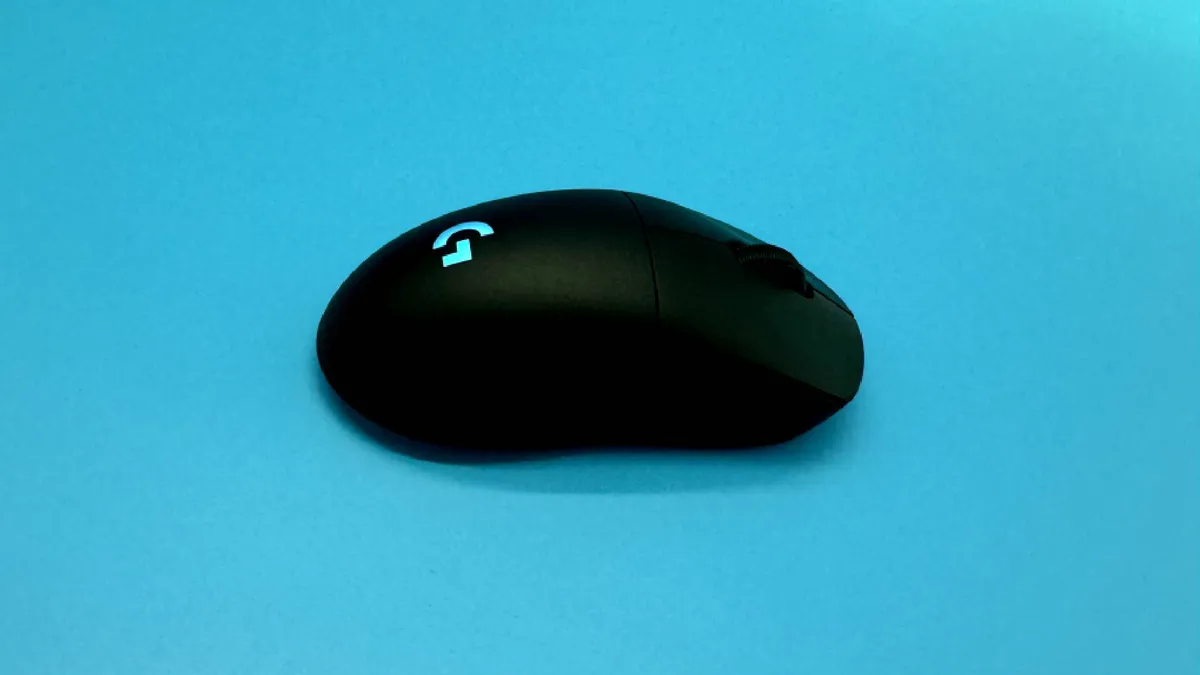


✅ You want interchangeable side buttons: Through the power of magnets and modern manufacturing processes, you can choose where to stick your side buttons and cover up the ugly cutouts on the other side.
❌ You want a light mouse: This is far from a heavy mouse, but there are far lighter mice on the market now. It's comfy to use, just don't expect something featherweight.
If you're a leftie, or just like to show off that you can use a mouse with both hands, the best ambidextrous gaming mouse is the Logitech G Pro 2 Lightspeed Wireless. It combines a reliable and snappy sensor with one of the best mouse shapes known to humankind.
It's essentially a slightly buffed version of its popular predecessor, the G Pro Wireless. The latter's not in stock for a good price in many places anymore, so it makes sense to opt for the newer version.
The reason this is great for both lefties and righties is that not only does it have a symmetrical shape, it can also have its side buttons shifted to the other side. Just peel away the magnetically attached covers and buttons and replace using the opposite side spares included in the box. Just like that, it's a left-handed mouse.
The G Pro 2 Lightspeed Wireless has a similar shape to the popular (but decidedly right-handed) Superlight, Superlight 2, and X2 or X3 Superstrike. It's great for claw grip gamers, who will make up most of its clientele for competitive gaming, but it is long and comfortable even with a palm grip.
Since launch, the mouse has also had its DPI boosted up to 44,000, and the Hero 2 sensor in general is a joy to use. It serves very well as a competitive gaming mouse. Or a casual one; whatever floats your boat.
For the money, you can make a good argument for the G Pro 2 Lightspeed Wireless even for right-handed gamers. Compared to the Superlight 2 and Superstrike it weighs a little more at 80 grams, but it does have the benefit of RGB lighting and a DPI button on the bottom, which is displayed via multiple LEDs below the scroll wheel for easy switching. So lefties don't have to lose out on pretty much any front, here.

Read our full Logitech G Pro 2 Lightspeed review.
Best ergonomic gaming mouse


✅ You spend a lot of time at your desk: If you spend loads of time with your hand on your mouse, your wrist might thank you for the shape of this one in the long run—and in the short run, too, because vertical mice can feel mighty comfy to use.
❌ You want a competitive advantage in games: Although vertical mice like the Keychron M5 are comfy to use, it's generally easier to be more accurate with a standard gaming mouse.
The best ergonomic gaming mouse is the Keychron M5, as it's the best comfy vertical mouse that happens to have a great sensor for gaming. Most ergo mice are sorely lacking on this front, but while Keychron doesn't market the M5 as a gaming mouse, it's certainly got the sensor for it, with up to 30,000 DPI and a polling rate of up to 8 kHz.
The M5 is ergonomic because it's a vertical mouse, which means you hold it with your wrist angled a little more naturally with palm facing inwards, using more of a squeezing motion to click. This, in theory, should help prevent issues such as repetitive strain injury (RSI), and should be more comfy to use in general. Comfort is certainly the name of the game here, as our Nick found out when he tested the mouse. He said it's "one of the most comfortable mice I have used for a very long time. So much so that using a traditionally designed mouse just feels quite painful after long use, in comparison."
This comfort and ergonomic design is combined with a sensor that we found to track very well during our testing. It might not match the absolute best gaming mice on the market, but it's pretty damn close and better than many. From a tracking standpoint there are few complaints here.
That doesn't mean it's perfect in all games, however. Just like with any vertical mouse, it isn't ideal for fast-paced shooters and the like. You just can't get the same level of fine control with your hand hovering diagonally as you can in a traditional hand-on-mouse position. That's in part because each mouse click runs the risk of moving your mouse slightly and throwing off your aim.
Still, for slower-paced games and ones that don't require quick and easy accuracy, it works perfectly well for gaming. And outside of gaming, you're getting the ergonomic support that your wrist will surely thank you for, plus some easy-to-use software, the ability to wirelessly connect to up to three devices via Bluetooth and one via USB 2.4 GHz, and two scroll wheels which can come in handy in some applications (think left-right as well as up-down scrolling).

Read our full Keychron M5 review.
Best gaming mouse for battery life


✅ You play competitive shooters: Not only does this have a hot swappable battery system that means you never have to plug in to charge, it's also a very performant, lightweight, comfy, competitive gaming mouse.
❌ You want the ability to plug in: This mouse completely lacks the option to plug it in, as it's lacking a charging port. Wireless connectivity is all you get, though thankfully it's ultra-wideband (UWB) which should be reliable.
The best gaming mouse for battery life is the SteelSeries Rival Pro. Or, indeed, the SteelSeries Sensei Pro, if you prefer a mouse that's pretty much identical but is symmetrically shaped. For my money, though, I love the ergonomic slant to the Rival Pro for palm grip.
The reason this is your best bet for battery life isn't because it has a battery with a ton of capacity, rather because it has a hot swappable battery system. If its juice starts running low, simply twist out the battery on the underside and replace it with the one from the wireless connection puck, which also charges it, and you're good to go.
This will mean the mouse should never run out of battery. Which is a good thing, because it's completely lacking a charging port, meaning it's truly wireless. Thankfully, connectivity is great, in part thanks to SteelSeries' use of ultra-wideband (UWB) connectivity, which is said to be more reliable and less vulnerable to interference than the regular 2.4 GHz wireless you get with most mice.
There are other gaming mice with hot swappable batteries, such as the Glorious Model O3 Wireless, but the Rival Pro (or Sensei Pro) is a better bet because it weighs a meagre 53 g and feels very pleasant under the palm. Stellar build quality is matched by a very performant sensor which hits up to 8K polling, and you can even mix and match different sensor and click polling rates if you wish.
In all, it might be expensive, but it's a solid competitive gaming mouse that just so happens to have a great hot swappable battery system. If you hate having to plug your mouse in to charge, I'd say this one's worth a look.

Read our full SteelSeries Rival Pro review.
How to spot the best deal
Where are the best gaming mouse deals?
In the US:
Amazon - Often some savings on PC gaming peripherals
Walmart - Usually some good savings on mice
Newegg - Big brand gaming mice for cheap
Best Buy - Great place to look for a cheap gaming mouse
In the UK:
Overclockers - Plenty of peripherals to choose from
Scan - Lots of sales events including gaming mice
In Australia:
Mwave - A huge range to choose from
Computer Alliance - Mice to suit every budget
Best gaming mouse Q&A
Why should I choose a gaming mouse over the average optical mouse?
For one thing, gaming mouse sensors are designed to be more responsive and accurate. With adjustable (or no) smoothing and acceleration, your aim will stay true. Gaming mice are more accessible because of their programmable buttons and versatility over traditional mice.
Is a wireless mouse good for gaming?
Historically, the answer was always: no. The wireless connection, though convenient, was used to add extra latency to the connection compared with a wired cable, which meant input lag in games was 'a thing'. For reference, that is also seen as a 'very bad thing' in competitive online games.
But modern wireless interfaces, primarily the 2.4 GHz radio connections, have zero perceptible difference in latency compared to a standard wired connection. Blind tests have been done with pro gamers using wired and wireless mice, and if the most sensitive players around can't tell the difference, we're confident you won't be able to either. There are even mice that connect over UWB now, which is supposed to be even more reliable than 2.4 GHz, such as the SteelSeries Rival Pro and Sensei Pro.
Bluetooth connections, however, can still introduce unwelcome input lag into a gaming situation, so that's best avoided. In modern wireless gaming mice, however, Bluetooth is only used as a low-power backup option.
What should I look out for in a gaming mouse?
When deciding on a mouse, your priority should be finding one that's comfortable for your hand. There are numerous sizes, shapes, and weights to consider. You might have the coolest-looking mouse with the most practical array of buttons, but if it's not comfortable for you, you won't be able to settle in with it. There are plenty of ambidextrous gaming mice and gaming mice for lefties in the list, too—if the goofy stance is more your style.
In the last few years, most gaming mice have also adopted very high DPI sensors (or more accurately, CPI), so even a budget mouse will likely perform well. Most of these sensors can handle extremely high DPI counts at up to 20,000 DPI when realistically, you'll play on a much lower sensitivity—generally under 2,000 DPI.
The consensus is not to worry about that number too much. Instead, concentrate on finding a mouse with the ideal shape and weight, and obviously, one that'll match your stylish set-up.
Pro gamers generally recommend lighter, more straightforward mice with few buttons to get in the way. Lighter mice won't fatigue your wrist and can easily glide across the mouse pad at high speeds. Anything below 100 grams is often ideal for competitive mice. But something has to be said about how powerful you feel at the helm of a nice, heavy mouse.
How we test gaming mice
We've used enough gaming mice to have a good feel for build quality, button placement, and shape. Our opinions on those aspects of mouse design are naturally subjective, but they're also well-informed. The tricky part of testing gaming mice is analyzing the other part of the equation: tracking performance, jitter, angle snapping, acceleration, and perfect control speed, and determining how each of those issues affects the experience of using a mouse.

For that, applications such as Mouse Tester come in handy. We use this software to see if we can spot any glaring issues with the mice we review. In every gaming mouse we test, though, angle snapping and acceleration are disabled in the mouse drivers by default.
For gaming, we primarily test mice with Destiny 2 and Apex Legends and twitchier shooters like Quake Champions to see how our performance stacks up against other mice. We scrutinize the cursor movement and responsiveness for lag, jitter, and other issues.
We use each mouse with its wireless receiver plugged into a nearby USB port, giving it the best possible wireless situation to work with. We also test the wireless receivers plugged into our test system a few feet away with obstacles in between, increasing the opportunity for lag and interference.
Jargon buster
Grip refers to how you hold the mouse. The most common grips are palm, claw, and fingertip. Here's a good example of how each grip works.
CPI stands for counts per inch, or how many times the mouse sensor will read its tracking surface, aka your mousepad, for every inch it’s moved. This is commonly referred to as DPI, but CPI is a more accurate term. The lower the CPI, the further you have to move the mouse to move the cursor on the screen.
Jitter refers to an inaccuracy in a mouse sensor reading the surface it’s tracking. Jitter often occurs at higher mouse movement speeds or higher CPIs. Jitter can make your cursor jump erratically, and even a small jitter could wreck a shot in an FPS or make you misclick on a unit in an RTS.
Angle snapping, also called prediction, takes data from a mouse sensor and modifies the output to create smoother movements. For example, if you try to draw a horizontal line with your mouse, it won’t be perfect—you’ll make some subtle curves in the line, especially at higher sensitivities. Angle snapping smooths out those curves and gives you a straight line instead. This is generally bad because it means your cursor movements won’t match your hand’s movements 1:1, and angle snapping will not be useful in most games. Thankfully, almost all gaming mice have angle snapping disabled by default.
Acceleration is probably the most reviled, most scrutinized issue with gaming mouse sensors. When a mouse sensor exhibits acceleration, your cursor will move faster the faster you move the mouse. This is often considered bad because moving the mouse slowly six inches across a mousepad will move the cursor differently than moving the mouse rapidly the same distance. This introduces variability that can be hard to predict.
Perfect control speed, or malfunction rate, refers to the speed at which the mouse can be moved while still tracking accurately. Most gaming mice will track extremely accurately when moved at slow speeds, but low CPI players will often move their mice large distances across the mousepads at very high speeds. At high speeds, especially at high CPIs, not all mouse sensors can retain their tracking accuracy. The point at which the sensors stop tracking accurately will differ between CPI levels.
IPS measures inches per second, and the effective maximum tracking speed of any given sensor is rated too. Not to be confused with the gaming monitor panel type by the same name, the higher the IPS of any given mouse, the better it can keep up with high-speed movement and maintain accuracy.
Lift-off distance is still a popular metric in mouse enthusiast circles, though it doesn't affect most gamers. LOD refers to the height a mouse has to be raised before the sensor stops tracking its surface. Some gamers prefer a mouse with a very low lift-off distance because they play at very low sensitivity and often have to lift their mouse off the pad to reset it in a position where they can continue swiping. With a low LOD, the cursor will not be moved erratically when the mouse is lifted.
